Build a Fantasy Football App: Live Lineups, Player Stats & Real-Time Scoring
Build a fantasy football app with live lineups, player stats, and real-time scoring using GOAL API. The data model, the endpoints, and copy-paste code to power it.


GOAL API
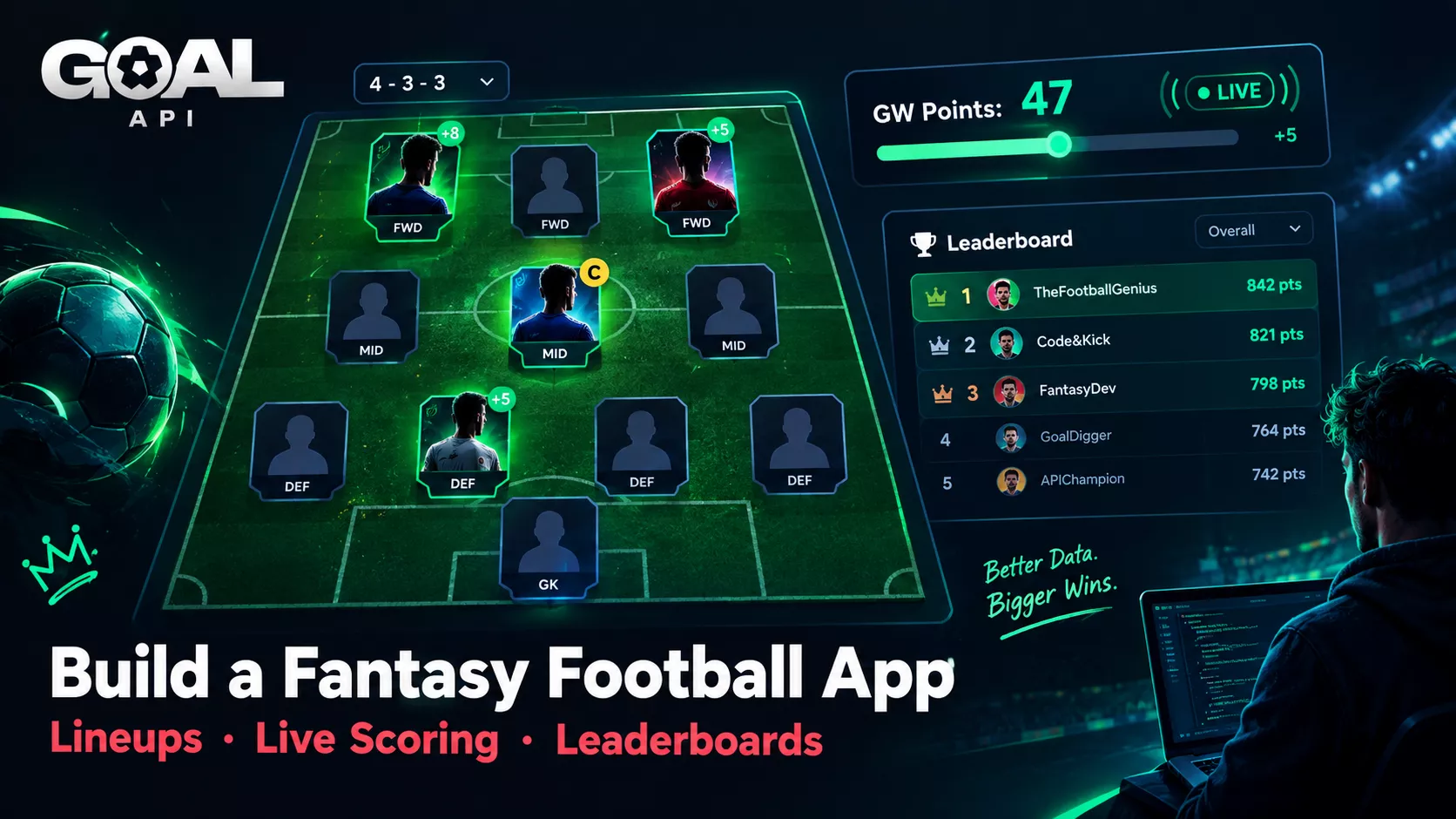
Every football season — and every major tournament — spawns a fresh wave of fantasy games. Official platforms, private leagues built for a group of friends, tournament-specific games that run for a month. They all share the same shape: users pick a squad, real matches happen, and points get calculated from what those players actually did on the pitch.
This guide shows you how to build a fantasy football app using GOAL API for the data layer — the player pool, confirmed lineups, and the live match events that drive scoring. The framework and database are yours; GOAL API supplies the football.
Get your free API key to follow along: goal-api.com/signup
The Fantasy Football Data Model
Before any code, get the shape clear. Fantasy football is simple in structure — five entities:
| Entity | What it is | Who owns it |
|---|---|---|
| Players | Every eligible player, with position & team | GOAL API (data) + your cache |
| Squads | Each user's picked players within a budget/rules | Your database |
| Lineups | The starting XI + captain a user sets per gameweek | Your database |
| Match events | Goals, assists, cards — the raw scoring inputs | GOAL API |
| Scores | Fantasy points computed from events × your rules | Your app's scoring engine |
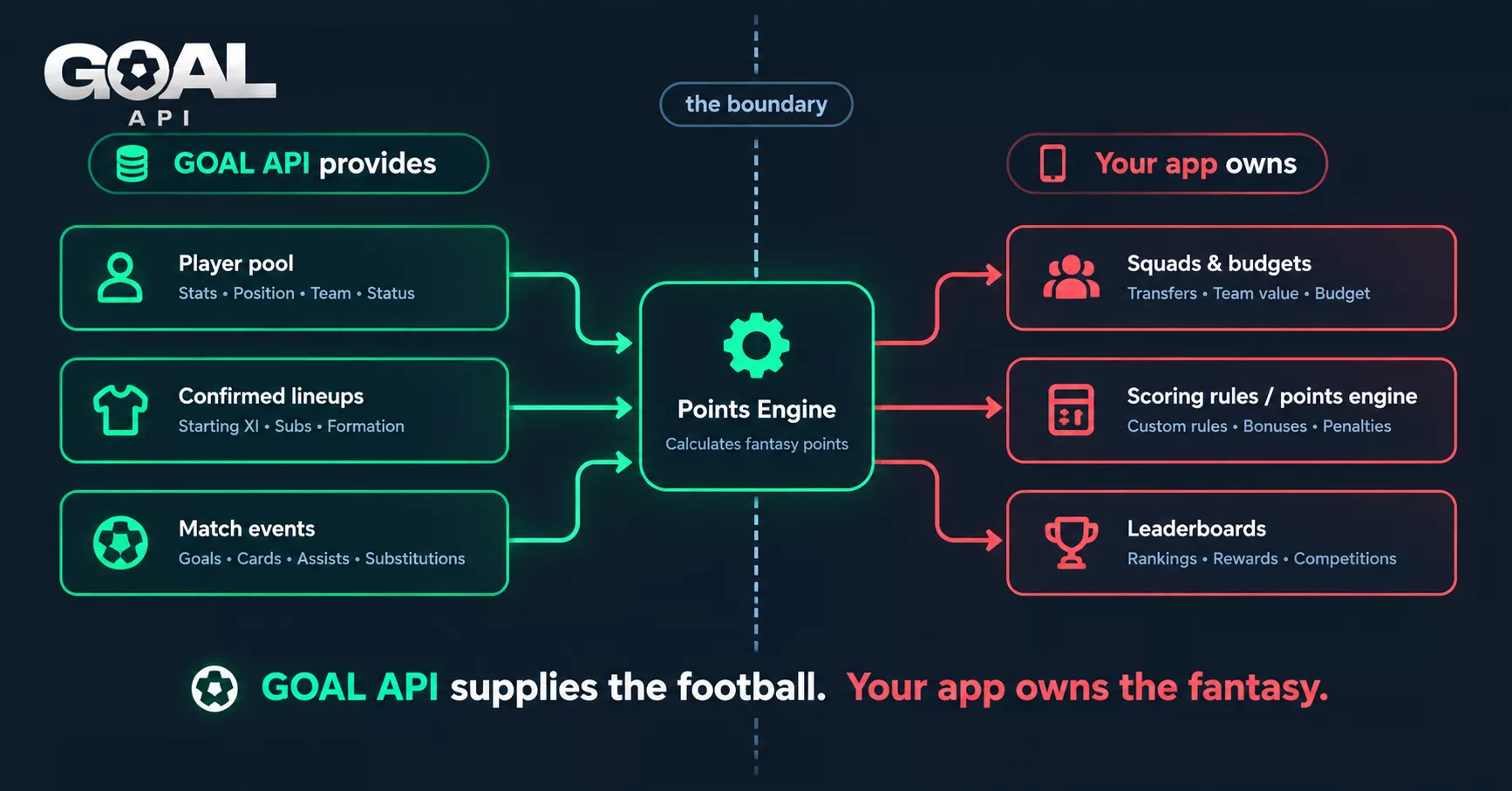
GOAL API provides the football reality — who played, who scored, who got booked. Your app owns the fantasy layer — squads, rules, budgets, and the points engine. Keep that boundary clean and the build is straightforward.
Step 1: Get the Player Pool
Your users pick from a pool of players. Build that pool from the leagues your game covers — which leagues are available is on the coverage page. Fetch players and cache them with position and team; the pool is largely stable across a season, so this is a build-time or daily job, not a per-request call.
// Search players and cache the pool (Node example)
async function buildPlayerPool(query) {
  const res = await fetch(
    `https://api.goal-api.com/v1/players/search?q=${encodeURIComponent(query)}`,
    { headers: { Authorization: `Bearer ${process.env.GOAL_API_KEY}` } }
  );
  const { data } = await res.json();
  return data.map(p => ({
    id: p.id,
    apiId: p.apiId,      // the key match events use to name a player
    name: p.name,
    position: p.type,    // 'Goalkeepers' | 'Defenders' | 'Midfielders' | 'Forwards'
    team: p.team?.name,
  }));
}
Endpoint: GET /players/search?q= — and GET /players/:id/statistics for each player's season numbers, useful for showing form during squad selection.
Step 2: Squad Selection & Validation
This step is entirely your app's logic — it's the fantasy layer. Users pick a squad (commonly 15 players) within a budget and position constraints. Store the squad in your own database keyed to the user. GOAL API isn't involved here beyond having supplied the player pool; validation, budgets, and rules are yours to define.
// Pseudocode — your rules, your database
function validateSquad(squad, budget) {
  const cost = squad.reduce((sum, p) => sum + p.price, 0);
  const gk   = squad.filter(p => p.position === 'Goalkeepers').length;
  return cost <= budget && gk === 2 && squad.length === 15;
}
// Persist to YOUR db:  squads[userId] = squad;
Step 3: Confirmed Lineups Before Kickoff
Fantasy games live and die on lineups. A user's captain being benched changes everything. About an hour before kickoff, confirmed lineups become available — pull them so your app knows who actually starts.
async function getConfirmedLineup(fixtureId) {
  const res = await fetch(
    `https://api.goal-api.com/v1/fixtures/${fixtureId}/lineups`,
    { headers: { Authorization: `Bearer ${process.env.GOAL_API_KEY}` } }
  );
  const { data } = await res.json();
  // { home: { startingLineups, substitutes, coach }, away: {...},
  //   homeFormation, awayFormation }. Each player has playerKey (= apiId).
  return data;
}
Endpoint: GET /fixtures/:id/lineups
Use this to flag users whose captain or key players didn't make the XI, and to decide which of a user's picks are eligible to score this gameweek.
Step 4: Live Scoring From Match Events
This is the heart of it. Fantasy points come from real match events — goals, assists, cards. Read each fixture's goals and cards and translate them into your scoring rules.
const api = async (path) => (await (await fetch(`https://api.goal-api.com/v1${path}`, {
  headers: { Authorization: `Bearer ${process.env.GOAL_API_KEY}` },
})).json()).data;

// Goals (with assists) and cards are two endpoints.
async function getMatchEvents(fixtureId) {
  const [goals, cards] = await Promise.all([
    api(`/fixtures/${fixtureId}/events`),
    api(`/fixtures/${fixtureId}/cards`),
  ]);
  return { goals, cards };
}
Endpoints: GET /fixtures/:id/events (goals and assists) | GET /fixtures/:id/cards
A simple points engine
// Map real events -> fantasy points (your rules)
const POINTS = { goal: 5, assist: 3, yellow: -1, red: -3 };

// Events name players by apiId (the lineup's playerKey), not by id.
function scoreEvents({ goals, cards }, apiId) {
  let pts = 0;
  for (const g of goals) {
    const scorer = g.homeScorerId || g.awayScorerId;
    const name   = g.homeScorer || g.awayScorer || '';
    // An own goal is listed under the player who put it in; don't reward it.
    if (scorer === apiId && !name.includes('(o.g.)')) pts += POINTS.goal;
    if ((g.homeAssistId || g.awayAssistId) === apiId) pts += POINTS.assist;
  }
  for (const c of cards) {
    if ((c.homePlayerId || c.awayPlayerId) !== apiId) continue;
    if (c.card === 'yellow card') pts += POINTS.yellow;
    if (c.card === 'red card')    pts += POINTS.red;
  }
  return pts;
}
The points values are yours to set — this is what makes your game distinct. GOAL API gives you the events; the rules are your product.
Step 5: Real-Time Points With WebSocket
Polling every fixture's events every 30 seconds works, but during a busy gameweek it means a lot of requests and a lag between a goal and the points updating. The WebSocket connection pushes events the instant they happen, so a user watching the match sees their points move in real time.
// A short-lived token keeps your API key out of the URL
const { data: { token } } = await (await fetch('https://api.goal-api.com/v1/ws/token', {
  method: 'POST',
  headers: { Authorization: `Bearer ${process.env.GOAL_API_KEY}` },
})).json();

// Subscribe to a match; update points on each event
const ws = new WebSocket(`wss://api.goal-api.com/ws?wsToken=${token}`);

// The first message must authenticate, with the same token
ws.addEventListener('open', () => ws.send(JSON.stringify({ type: 'auth', token })));

ws.addEventListener('message', (e) => {
  const msg = JSON.parse(e.data);
  if (msg.type === 'auth_success') {
    ws.send(JSON.stringify({ type: 'subscribe', resource: 'match', matchId: fixtureId }));
  }
  if (msg.type === 'match_update') {
    // msg.data.id is the fixture; msg.data.goalscorer / cards carry the new events.
    // Recompute affected users' points from the new event
    applyLiveEvent(msg.data);
  }
});
The full connection, auth, and reconnection pattern is in the live scores over WebSocket guide. If you'd rather not hold a persistent connection, webhook events can POST goal.scored to your server instead — the trade-offs are covered in the polling vs WebSocket vs webhooks post.
Step 6: Leaderboards
Leaderboards are pure application logic on top of the points you've already computed. Sum each user's gameweek points in your database and rank them. No API call needed — this is your data now.
-- Your database, your query
SELECT user_id, SUM(gameweek_points) AS total
FROM fantasy_scores
GROUP BY user_id
ORDER BY total DESC;
Endpoints You'll Use
| Endpoint | Method | Role in your fantasy app |
|---|---|---|
| /players/search?q= | GET | Build the player pool |
| /players/:id/statistics | GET | Show player form during selection |
| /fixtures/date/:date | GET | Find the gameweek's fixtures |
| /fixtures/:id/lineups | GET | Confirmed starting XI before kickoff |
| /fixtures/:id/events | GET | Raw scoring inputs: goals and assists |
| /fixtures/:id/cards | GET | Raw scoring inputs: cards |
| /leagues/:id/top-scorers | GET | Optional: highlight in-form players |
| wss://api.goal-api.com/ws | WS | Real-time points updates |
What to Build Next
Captain multipliers & chips — layer game mechanics on top of the points engine. Pure app logic; the event data doesn't change.
Player form widgets — use /players/:id/statistics and /leagues/:id/top-scorers to help users pick.
Live mini-league view — combine the WebSocket feed with your leaderboard query so a private league updates live during matches.
Deadline automation — lock squads at the first kickoff of the gameweek using /fixtures/date/:date kickoff times.
Start building free → goal-api.com/signup | No credit card | Every endpoint except odds and predictions