Build a Live Football Score App in JavaScript: Every Endpoint You Actually Need (No Fluff)
Build a real-time football score app with JavaScript and Node.js using GOAL API. Live scores, standings, player stats, odds — copy-paste code with the exact endpoints.


GOAL API
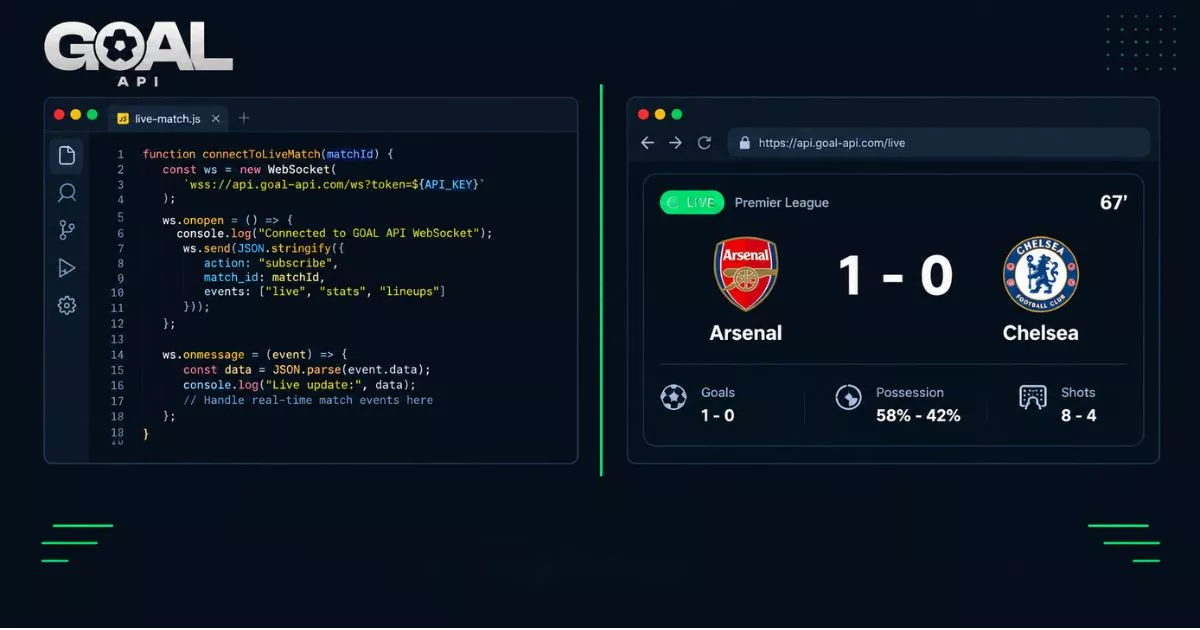
This one uses GOAL API — a dedicated football data API with an official JavaScript SDK, real documentation, and endpoints that don't vanish between seasons. By the end of this post you'll have working Node.js code for live scores, standings, player stats, odds, and a WebSocket connection that pushes goals to your frontend in real time.
Every endpoint here is taken directly from the GOAL API documentation. No invented routes.
Get your free API key (no credit card): goal-api.com/signup
Two Ways to Integrate: Raw Fetch vs the Official SDK
Before writing any code, pick your integration style.
Option A — Raw fetch (works everywhere)
Works in Node 18+, browsers, Deno, Bun, and Cloudflare Workers — anywhere fetch is available.
const BASE_URL = 'https://api.goal-api.com/v1';
const API_KEY  = process.env.GOAL_API_KEY;

async function get(path, params = {}) {
  const url = new URL(`${BASE_URL}${path}`);
  Object.entries(params).forEach(([k, v]) => url.searchParams.set(k, v));

  const res = await fetch(url, {
    headers: { Authorization: `Bearer ${API_KEY}` },
  });

  if (!res.ok) throw new Error(`GOAL API error: ${res.status}`);
  const json = await res.json();
  return json.data;
}
Option B — Official SDK (recommended for production)
npm install @goalapi/sdkimport { GoalApi } from '@goalapi/sdk';
const client = new GoalApi({ apiKey: process.env.GOAL_API_KEY });The official JavaScript SDK handles retries, pagination, typed errors, and the WebSocket lifecycle. Under the hood it calls the same endpoints as Option A. The tutorial below uses raw fetch so you can see exactly what's happening — swap to the SDK for production.
Every GOAL API response follows the same envelope: { success: true, data: {...} }. So json.data is always your payload.
1. Fetch Live Scores Right Now
The core of any football app. GET /fixtures/live returns every match currently in play.
async function getLiveScores() {
  const matches = await get('/fixtures/live');

  if (!matches.length) {
    console.log('No live matches right now.');
    return;
  }

  for (const match of matches) {
    const { homeTeam, awayTeam, league, homeTeamScore, awayTeamScore, matchMinute, matchStatus } = match;
    console.log(
      `[${league.name}] ${homeTeam.name} ${homeTeamScore}–${awayTeamScore} ${awayTeam.name} | ${matchMinute || matchStatus}'`
    );
  }
}

getLiveScores();
Sample output:
[Premier League] Arsenal 1–0 Chelsea | 67'
[La Liga] Real Madrid 2–1 Barcelona | 81'
[Champions League] Bayern 0–0 PSG | 45+2'
Endpoint: GET /fixtures/live
Every match object carries an id — the fixture ID you'll use in every subsequent call to get events, lineups, and odds for a specific game.
2. Get Today's Full Fixture List
Useful for a match schedule page, a daily digest bot, or a fixture widget.
async function getFixturesByDate(date) {
  // date: 'YYYY-MM-DD'
  const fixtures = await get(`/fixtures/date/${date}`);

  for (const match of fixtures) {
    const { homeTeam, awayTeam, league, kickoffUtc, matchStatus } = match;

    // Always use kickoffUtc — ISO-8601 in UTC, no offset drift
    const localKickoff = new Date(kickoffUtc).toLocaleTimeString('en-GB', {
      hour: '2-digit', minute: '2-digit', timeZoneName: 'short',
    });

    console.log(`${localKickoff} | [${league.name}] ${homeTeam.name} vs ${awayTeam.name} | ${matchStatus}`);
  }
}

const today = new Date().toISOString().slice(0, 10);
getFixturesByDate(today);
Endpoint: GET /fixtures/date/:date
Always build on kickoffUtc. It's a real ISO-8601 string in UTC. JavaScript's new Date(kickoffUtc) parses it correctly. Convert to the user's local timezone client-side — no timezone parameter is accepted by the API, by design.
3. League Standings
Get the full league table for any competition. First, find your league ID:
// Find a league ID by name
async function findLeague(name) {
  return get('/leagues', { search: name });
}

findLeague('premier league').then(console.log);
// Returns: [{ id: 'cmr77dvkr005nrx06lp7rvp49', name: 'Premier League', country: { name: 'England' } }, ...]
Then pull the table:
async function getStandings(leagueId) {
  const table = await get(`/standings/${leagueId}`);

  console.log(`${'Pos'.padEnd(5)}${'Team'.padEnd(28)}${'P'.padEnd(4)}${'W'.padEnd(4)}${'D'.padEnd(4)}${'L'.padEnd(4)}${'GD'.padEnd(6)}Pts`);
  console.log('─'.repeat(65));

  for (const row of table) {
    const goalDifference = Number(row.overallLeagueGF) - Number(row.overallLeagueGA);
    console.log(
      `${String(row.overallLeaguePosition).padEnd(5)}` +
      `${row.team.name.padEnd(28)}` +
      `${String(row.overallLeaguePlayed).padEnd(4)}` +
      `${String(row.overallLeagueW).padEnd(4)}` +
      `${String(row.overallLeagueD).padEnd(4)}` +
      `${String(row.overallLeagueL).padEnd(4)}` +
      `${String(goalDifference).padEnd(6)}` +
      `${row.overallLeaguePTS}`
    );
  }
}

getStandings('cmr77dvkr005nrx06lp7rvp49');  // Premier League
Endpoints: GET /leagues | GET /standings/:leagueId
Need split views? Four sub-endpoints are available:
const homeTable = await get(`/standings/${leagueId}/home`);
const awayTable = await get(`/standings/${leagueId}/away`);
const zones     = await get(`/standings/${leagueId}/zones`);   // Promotion / relegation
const withForm  = await get(`/standings/${leagueId}/form`);    // Last 5 results column
4. Match Events, Goals & Cards
Once you have a fixtureId from the live scores or fixture list, pull the full event timeline:
async function getMatchTimeline(fixtureId) {
  const [goals, cards, substitutions] = await Promise.all([
    get(`/fixtures/${fixtureId}/events`),
    get(`/fixtures/${fixtureId}/cards`),
    get(`/fixtures/${fixtureId}/substitutions`),
  ]);

  const timeline = [
    ...goals.map(e => ({
      minute: e.time, icon: '⚽',
      text: `${e.homeScorer || e.awayScorer || 'Unknown'} (${e.homeScorer ? 'home' : 'away'}) ${e.score}`,
    })),
    ...cards.map(c => ({
      minute: c.time, icon: c.card.includes('red') ? '🟥' : '🟨',
      text: `${c.homeFault || c.awayFault || 'Unknown'} (${c.homeFault ? 'home' : 'away'})`,
    })),
    ...substitutions.map(s => ({
      minute: s.time, icon: '🔄',
      text: `${s.substitution} (${s.team})`,   // "player off | player on"
    })),
  ].sort((a, b) => parseInt(a.minute) - parseInt(b.minute));

  for (const event of timeline) {
    console.log(`${event.icon} ${event.minute}' ${event.text}`);
  }
}
Endpoint: GET /fixtures/:id/events
Pull only cards or only substitutions with dedicated endpoints:
const cards         = await get(`/fixtures/${fixtureId}/cards`);
const substitutions = await get(`/fixtures/${fixtureId}/substitutions`);
Endpoints: GET /fixtures/:id/cards | GET /fixtures/:id/substitutions
5. Pre-Match Odds
This unlocks betting previews, value-bet tools, and fantasy pick helpers. Odds cover 1X2, double chance, both-teams-to-score, Asian handicap, and over/under lines.
async function getOdds(fixtureId) {
  const odds = await get(`/fixtures/${fixtureId}/odds`);

  for (const book of odds) {
    const { bookmaker, odd1, oddX, odd2, overUnder } = book;

    console.log(`\n[${bookmaker}]`);
    console.log(`  1X2 — Home: ${odd1} | Draw: ${oddX} | Away: ${odd2}`);

    if (overUnder) {
      for (const line of ['0.5', '1.5', '2.5', '3.5']) {
        console.log(`  O/U ${line}: over=${overUnder[`o+${line}`]} under=${overUnder[`u+${line}`]}`);
      }
    }
  }
}
Endpoint: GET /fixtures/:id/odds
In-play odds
Updated every 2 minutes while a match runs:
const liveOdds = await get(`/fixtures/${fixtureId}/live-odds`);Endpoint: GET /fixtures/:id/live-odds
Pre-match odds sync every 3 hours for a rolling 72-hour window. Which leagues are priced is listed per-competition on the coverage page — odds coverage varies across the 1,000+ leagues.
6. Player Statistics
For fantasy football apps, player comparison features, or season stat pages.
// Search for a player first
async function searchPlayer(name) {
  return get('/players/search', { q: name });
}

// Then pull their season stats
async function getPlayerStats(playerId) {
  const stats = await get(`/players/${playerId}/statistics`);
  const { goals, assists, matchPlayed, minutes, yellowCards, redCards } = stats.performance;

  console.log(`Goals:      ${goals}`);
  console.log(`Assists:    ${assists}`);
  console.log(`Apps:       ${matchPlayed} (${minutes} mins)`);
  console.log(`Cards:     🟨 ${yellowCards}  🟥 ${redCards}`);
}

const results = await searchPlayer('Erling Haaland');
await getPlayerStats(results[0].id);
Endpoints: GET /players/search?q= | GET /players/:id/statistics
Compare two players side by side or pull the league's top performers:
const comparison = await get('/players/compare', { ids: `${id1},${id2}` });
const topScorers = await get(`/leagues/${leagueId}/top-scorers`);
const topAssists = await get('/players/top/assists');
Endpoints: GET /players/compare?ids= | GET /leagues/:id/top-scorers | GET /players/top/assists
7. Real-Time Goals Over WebSocket
This is what separates a live score app from a live score refresh. Instead of polling /fixtures/live every 30 seconds and burning through your daily quota, you open one persistent connection and receive goal alerts the instant they happen. See the full WebSocket reference in the documentation.
The browser can't set custom headers on a WebSocket handshake, so the flow uses a short-lived token:
WebSocket token flow
// Step 1: Exchange your API key for a connection token (server-side only)
async function getWsToken() {
  const res = await fetch('https://api.goal-api.com/v1/ws/token', {
    method: 'POST',
    headers: { Authorization: `Bearer ${process.env.GOAL_API_KEY}` },
  });
  const { data } = await res.json();
  return data.token;  // valid for 60s, single-use
}

// Step 2: Connect, authenticate, subscribe
async function connectToLiveMatch(fixtureId) {
  const token = await getWsToken();
  const ws    = new WebSocket(`wss://api.goal-api.com/ws?wsToken=${token}`);

  ws.addEventListener('open', () => {
    ws.send(JSON.stringify({ type: 'auth', token }));
  });

  ws.addEventListener('message', (event) => {
    const msg = JSON.parse(event.data);

    if (msg.type === 'auth_success') {
      console.log('Connected. Subscribing to match', fixtureId);
      ws.send(JSON.stringify({
        type: 'subscribe',
        resource: 'match',
        matchId: String(fixtureId),
      }));
    }

    if (msg.type === 'match_update') {
      const { match_hometeam_score, match_awayteam_score, goalscorer } = msg.data;
      console.log(`Score: ${match_hometeam_score}–${match_awayteam_score}`);
      goalscorer?.forEach(g => console.log(`⚽ GOAL: ${g.home_scorer || g.away_scorer} (${g.time}')`));
    }

    if (msg.type === 'error') {
      console.error('WS error:', msg.error.code, msg.error.message);
      // msg.error.category: 'authentication' | 'rate_limit' | ...
    }
  });

  // Always handle close — networks drop
  ws.addEventListener('close', () => {
    console.log('Connection closed. Reconnecting in 5s...');
    setTimeout(() => connectToLiveMatch(fixtureId), 5000);
  });
}
WebSocket URL: wss://api.goal-api.com/ws
Token endpoint: POST /v1/ws/token
Two things most teams miss: (1) The token is single-use and expires in 60 seconds — fetch a fresh one on every reconnect, never cache it. (2) Always add reconnection logic. The close handler above retries after 5 seconds; in production use exponential backoff.
Concurrent match subscriptions depend on your plan — every plan includes WebSocket access, including the free tier: Free allows 1 connection and 25 simultaneous matches; paid plans allow 5 connections and from 50 up to 1,000 simultaneous matches. Full breakdown on the pricing page.
8. Handling Rate Limits in JavaScript
Every GOAL API response comes back with three headers. Read them before your quota runs dry:
| Header | What it tells you |
|---|---|
| X-RateLimit-Limit | Your total daily request allowance |
| X-RateLimit-Remaining | Requests remaining before daily reset |
| X-RateLimit-Reset | Unix timestamp when the daily quota resets |
async function getWithHeaders(path) {
  const res = await fetch(`${BASE_URL}${path}`, {
    headers: { Authorization: `Bearer ${API_KEY}` },
  });

  const remaining = res.headers.get('X-RateLimit-Remaining');
  const limit     = res.headers.get('X-RateLimit-Limit');
  const reset     = res.headers.get('X-RateLimit-Reset');
  console.log(`Quota: ${remaining}/${limit} | Resets: ${reset}`);

  if (res.status === 429) {
    const body      = await res.json();
    const errorCode = body?.code;

    if (errorCode === 'BURST_LIMIT_EXCEEDED') {
      // Fired > 130 req/s — back off for 1 second
      console.warn('Burst limit hit — retrying in 1s');
      await new Promise(r => setTimeout(r, 1000));
    } else {
      // QUOTA_EXCEEDED — daily allowance gone
      const retryAfter = parseInt(reset) - Math.floor(Date.now() / 1000);
      console.warn(`Daily quota hit. Retry in ${retryAfter}s`);
    }
    return null;
  }

  if (!res.ok) throw new Error(`API error: ${res.status}`);
  return (await res.json()).data;
}
The documentation distinguishes two types of 429: QUOTA_EXCEEDED (daily gone — wait for reset timestamp) and BURST_LIMIT_EXCEEDED (>130 req/s — clears within one second). Always check code in the response body.
What to Build Next
Live score dashboard (React + polling) — Call /fixtures/live every 30 seconds inside a setInterval in useEffect. For a busy Saturday with 20 live matches, the WebSocket vs polling blog post shows the request math — polling costs ~43,200 requests; a WebSocket connection costs one.
Match preview page — Combine /h2h/:team1Id/:team2Id/stats + /fixtures/:id/lineups + /fixtures/:id/odds + /fixtures/:id/predictions. The match preview page tutorial covers exactly this pattern.
Goal alert bot (Discord / Slack) — Register a webhook endpoint in the dashboard. Every goal.scored event POSTs to your URL. No polling, no WebSocket to maintain. Read the webhook signature verification guide before shipping.
Fantasy points tracker — /players/:id/statistics + /fixtures/:id/lineups + /leagues/:id/top-scorers. Pull the confirmed lineup an hour before kickoff, then track live events to calculate points in real time.
Quick Reference: Every Endpoint Used in This Post
| Endpoint | Method | What it returns |
|---|---|---|
| /fixtures/live | GET | All currently live matches |
| /fixtures/date/:date | GET | All fixtures on a given date (YYYY-MM-DD) |
| /fixtures/:id/events | GET | Goals, cards, subs timeline |
| /fixtures/:id/cards | GET | Cards only |
| /fixtures/:id/substitutions | GET | Substitutions only |
| /fixtures/:id/odds | GET | Pre-match odds (all bookmakers) |
| /fixtures/:id/live-odds | GET | In-play odds (updates every 2 min) |
| /standings/:leagueId | GET | Full league table |
| /standings/:leagueId/home | GET | Home-only standings |
| /standings/:leagueId/away | GET | Away-only standings |
| /standings/:leagueId/form | GET | Standings with last-5 form guide |
| /standings/:leagueId/zones | GET | Promotion / relegation zones |
| /leagues | GET | All leagues with IDs and metadata |
| /players/search?q= | GET | Search players by name |
| /players/:id/statistics | GET | Player season stats |
| /players/compare?ids= | GET | Side-by-side player comparison |
| /leagues/:id/top-scorers | GET | League top scorers |
| /players/top/assists | GET | Cross-league top assist providers |
| POST /v1/ws/token | POST | Get a single-use WebSocket connection token |
Full reference with request / response shapes at goal-api.com/documentation.
Start building free → goal-api.com/signup | No credit card | Same endpoints as every paid plan