Build a Discord Goal-Alert Bot: Live Football Scores in Your Server
Build a Discord bot that posts live football goals, cards, and lineups using GOAL API. Slash commands, real-time alerts over WebSocket, copy-paste Node.js code.


GOAL API
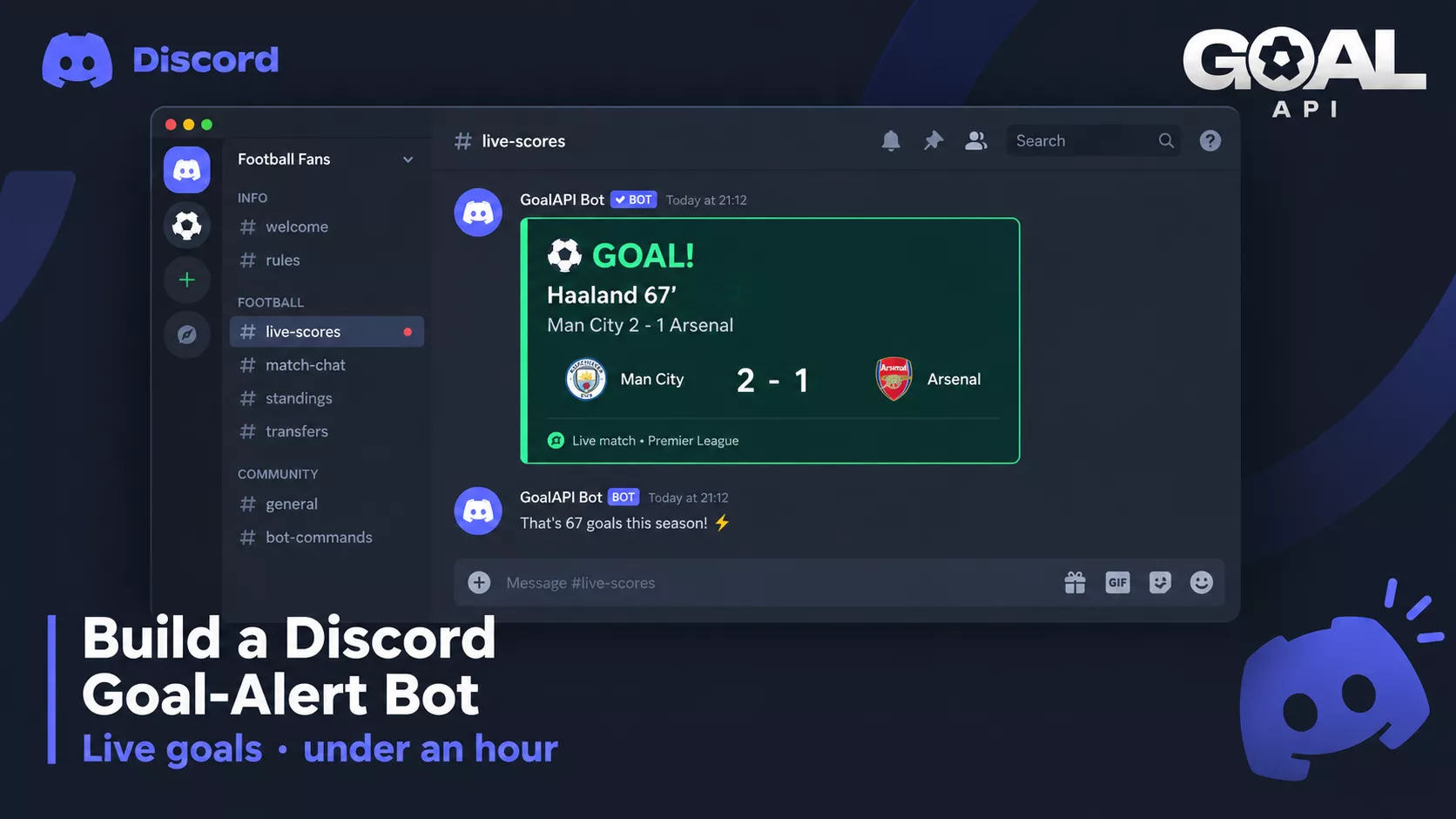
Football Discord servers all want the same thing: the goal posted in the channel the instant it happens, not thirty seconds after everyone's already seen it on TV. There are paid bots that do this — but if you run the community, building your own means no per-team limits, no subscription, and full control over what gets posted.
This tutorial builds a Discord goal-alert bot with GOAL API for the football data and discord.js for the bot. Slash commands for live scores and standings, and real-time goal alerts pushed into your channel. Every endpoint here is from the GOAL API documentation — nothing improvised.
Get your free API key (no credit card): goal-api.com/signup
What You're Building
A bot with two halves:
Slash commands — a user types /live or /table and the bot replies with current data on demand
Real-time alerts — the bot watches subscribed matches and posts a goal, card, or full-time result into the channel automatically as it happens
The football data is GOAL API's job. Everything Discord-specific — commands, embeds, which channel gets what — is your bot's job. Keep that line clean and the build is quick.
Step 1: Create the Discord Bot
In the Discord Developer Portal, create an application, add a Bot, and copy its token. Invite it to your server with the bot and applications.commands scopes. Then scaffold the project:
npm init -y
npm pkg set type=module   # the examples use import syntax
npm install discord.js dotenv## .env
DISCORD_TOKEN=your_bot_token
GOAL_API_KEY=your_goal_api_key
CLIENT_ID=your_application_id// index.js — the client and a tiny GOAL API helper
import 'dotenv/config';
import { Client, GatewayIntentBits } from 'discord.js';
const client = new Client({ intents: [GatewayIntentBits.Guilds] });
const BASE = 'https://api.goal-api.com/v1';
async function goal(path) {
const res = await fetch(`${BASE}${path}`, {
headers: { Authorization: `Bearer ${process.env.GOAL_API_KEY}` },
});
if (!res.ok) throw new Error(`GOAL API ${res.status}`);
return (await res.json()).data;
}
client.once('ready', () => console.log(`Logged in as ${client.user.tag}`));
client.login(process.env.DISCORD_TOKEN);Step 2: A Slash Command for Live Scores
Register a /live command, then answer it by calling GET /fixtures/live.
import { REST, Routes, SlashCommandBuilder } from 'discord.js';

const commands = [
  new SlashCommandBuilder().setName('live')
    .setDescription('Show football matches in play right now').toJSON(),
];

const rest = new REST().setToken(process.env.DISCORD_TOKEN);
await rest.put(Routes.applicationCommands(process.env.CLIENT_ID),
  { body: commands });

client.on('interactionCreate', async (i) => {
  if (!i.isChatInputCommand() || i.commandName !== 'live') return;
  await i.deferReply();
  const matches = await goal('/fixtures/live');
  if (!matches.length) return i.editReply('No matches in play right now.');
  const lines = matches.slice(0, 10).map(m =>
    `**${m.homeTeam.name} ${m.homeTeamScore}-${m.awayTeamScore} ${m.awayTeam.name}** ` +
    `· ${m.league.name} · ${m.matchMinute}'`);
  await i.editReply(lines.join('\n'));
});
Endpoint: GET /fixtures/live
Step 3: Match Events as Rich Embeds
A flat list is fine, but Discord embeds look far better in a football channel. Pull a match's goals, cards and substitutions and build an embed.
import { EmbedBuilder } from 'discord.js';

// Goals, cards and substitutions come from three endpoints; merge by minute.
async function matchEmbed(fixtureId) {
  const [goals, cards, subs] = await Promise.all([
    goal(`/fixtures/${fixtureId}/events`),
    goal(`/fixtures/${fixtureId}/cards`),
    goal(`/fixtures/${fixtureId}/substitutions`),
  ]);
  const lines = [
    ...goals.map(g => [g.timeNum, `\u26BD ${g.time}' GOAL — ${g.homeScorer || g.awayScorer} (${g.score})`]),
    ...cards.map(c => [c.timeNum, `${c.card === 'red card' ? '\u{1F7E5}' : '\u{1F7E8}'} ${c.time}' ${c.homeFault || c.awayFault}`]),
    ...subs.map(x => [x.timeNum, `\u{1F504} ${x.time}' ${x.substitution.split('|').map(t => t.trim()).reverse().join(' on for ')}`]),
  ].sort((a, b) => a[0] - b[0]).map(([, line]) => line);

  return new EmbedBuilder()
    .setTitle('Match events')
    .setDescription(lines.join('\n') || 'No events yet')
    .setColor(0x16A34A);
}
Endpoints: GET /fixtures/:id/events (goals) | /cards | /substitutions
Step 4: Real-Time Goal Alerts (Two Ways)
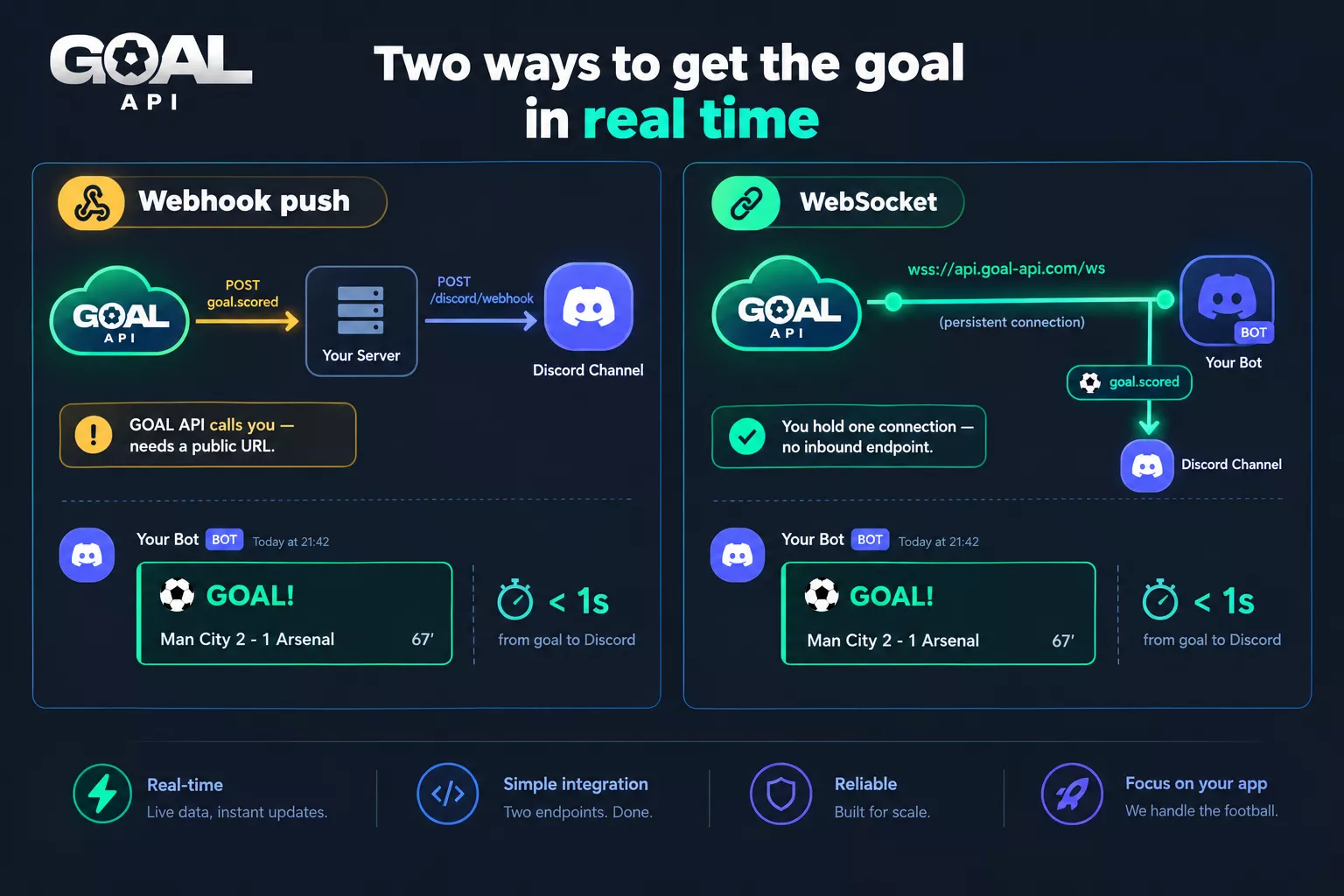
This is what makes it a goal-alert bot rather than a scoreboard. You need the goal pushed to you the moment it happens. Two approaches — pick by how you host the bot. The polling vs WebSocket vs webhooks post breaks down the trade-offs; here's how each looks for a Discord bot.
Option A — Webhook push (simplest)
Register a webhook endpoint so GOAL API POSTs goal.scored events to a small HTTP server. When one arrives, post to the Discord channel. Always verify the signature before trusting the payload.
import express from 'express';
const app = express();

// Raw body: the signature is computed over the exact bytes we were sent.
app.post('/goal-webhook', express.raw({ type: 'application/json' }), async (req, res) => {
  // 1. verify the X-Goal-Signature header against req.body (see linked guide) — reject if invalid
  const { event, data } = JSON.parse(req.body);
  res.sendStatus(200); // acknowledge fast, then do the work

  if (event === 'goal.scored') {
    // The payload has teams and score; the scorer comes from the events endpoint.
    const goals = await goal(`/fixtures/${data.fixtureId}/events`);
    const last = goals.at(-1);
    const scorer = last ? `${last.homeScorer || last.awayScorer} ${last.time}' ` : '';
    const channel = client.channels.cache.get(TARGET_CHANNEL_ID);
    channel?.send(`\u26BD **GOAL!** ${scorer}— ` +
      `${data.homeTeam} ${data.score.home}-${data.score.away} ${data.awayTeam}`);
  }
});
app.listen(3000);
Best when your bot already runs on a host with a public URL. No connection to keep alive — GOAL API calls you.
Option B — WebSocket (one persistent connection)
If you'd rather not expose an HTTP endpoint, open a WebSocket connection and subscribe to matches. Events arrive on the socket; you post them to Discord. The live scores over WebSocket guide has the full connection, auth, and reconnection pattern.
// A short-lived, single-use token keeps your API key out of the URL
const { token } = await (await fetch(`${BASE}/ws/token`, {
  method: 'POST',
  headers: { Authorization: `Bearer ${process.env.GOAL_API_KEY}` },
})).json().then(r => r.data);

const ws = new WebSocket(`wss://api.goal-api.com/ws?wsToken=${token}`);
const posted = new Map(); // fixtureId -> goals already announced

ws.addEventListener('open', () => ws.send(JSON.stringify({ type: 'auth', token })));

ws.addEventListener('message', async (ev) => {
  const msg = JSON.parse(ev.data);
  if (msg.type === 'auth_success') {
    // Subscribe to each match you care about (your plan sets how many at once)
    for (const m of await goal('/fixtures/live')) {
      ws.send(JSON.stringify({ type: 'subscribe', resource: 'match', matchId: m.id }));
    }
  }
  if (msg.type === 'match_update') {
    // Each update carries the match's full goal list: announce only the new ones.
    const goals = msg.data.goalscorer ?? [];
    const seen = posted.get(msg.data.id) ?? 0;
    for (const g of goals.slice(seen)) {
      const channel = client.channels.cache.get(TARGET_CHANNEL_ID);
      channel?.send(`\u26BD **GOAL!** ${g.home_scorer || g.away_scorer} (${g.time}') ` +
        `${msg.data.match_hometeam_name} ${g.score} ${msg.data.match_awayteam_name}`);
    }
    posted.set(msg.data.id, goals.length);
  }
});
Rule of thumb: webhooks if your bot has a public URL and you want the least code to maintain; WebSocket if you want one outbound connection and no inbound endpoint. Both deliver the goal in real time — the difference is who initiates the connection.
Step 5: Let Users Subscribe to Teams
A goal from every match on earth is noise. Let each channel subscribe to specific teams, store those subscriptions in your own database, and filter events before posting. Which teams and competitions are available is on the coverage page.
// /follow <team>  — your DB, your logic
// subscriptions[channelId] = Set of team names
// (webhook payloads name teams as data.homeTeam / data.awayTeam;
//  WebSocket updates as match_hometeam_name / match_awayteam_name)

function shouldPost(channelId, homeTeam, awayTeam) {
  const subs = subscriptions[channelId];
  if (!subs) return false;
  return subs.has(homeTeam) || subs.has(awayTeam);
}
The subscription list is the bot's data — GOAL API supplies the events, your bot decides who wants to see them.
Step 6: Standings & Top Scorers Commands
Round out the bot with on-demand reference commands. GET /standings/:leagueId for a table, GET /leagues/:id/top-scorers for the golden-boot race.
// /table <leagueId>
const table = await goal(`/standings/${leagueId}`);
const rows = table.slice(0, 10).map(r =>
  `${r.overallLeaguePosition}. ${r.team.name} — ${r.overallLeaguePTS} pts`);

// /topscorers <leagueId>
const scorers = (await goal(`/leagues/${leagueId}/top-scorers`))
  .sort((a, b) => a.playerPlace - b.playerPlace)
  .slice(0, 10)
  .map(p => `${p.playerPlace}. ${p.playerName} (${p.teamName}) — ${p.goals}`);
Endpoints: GET /standings/:leagueId | GET /leagues/:id/top-scorers
Deploying & Keeping It Alive
A Discord bot needs to run continuously. Host it anywhere that keeps a Node process alive — a small VPS, a container platform, or a always-on hobby host. Watch two things:
Reconnection — Discord and (if you use it) the WebSocket both drop occasionally. Handle close events and reconnect with backoff.
Rate limits — read the rate-limit headers on GOAL API responses so a busy match day doesn't exhaust your quota. Subscribing only to followed teams keeps request volume sane.
Endpoints You'll Use
| Endpoint | Method | Role in the bot |
|---|---|---|
| /fixtures/live | GET | /live command |
| /fixtures/:id/events | GET | Goals for event embeds |
| /fixtures/:id/cards | GET | Cards for event embeds |
| /fixtures/:id/substitutions | GET | Substitutions for event embeds |
| /standings/:leagueId | GET | /table command |
| /leagues/:id/top-scorers | GET | /topscorers command |
| /leagues?search= | GET | Resolve league IDs for commands |
| /ws/token | POST | Short-lived WebSocket token (Option B) |
| wss://api.goal-api.com/ws | WS | Real-time goal alerts (Option B) |
What to Build Next
Half-time & full-time summaries — post a recap embed when a match status changes, using the events you've already collected.
Lineup announcements — pull /fixtures/:id/lineups an hour before kickoff and post the starting XI.
Prediction game — a fantasy-style points engine.
Multi-language embeds — the data is language-neutral; localise your embed text for international servers.
Start building free → goal-api.com/signup | No credit card | Every endpoint except odds and predictions