Football MCP Server: Connect AI Agents to Live Football Data
Connect Claude, Cursor or any AI agent to live football data with the GOAL API MCP server. One config entry, 14 read-only tools, queried by name. Setup included.


GOAL API
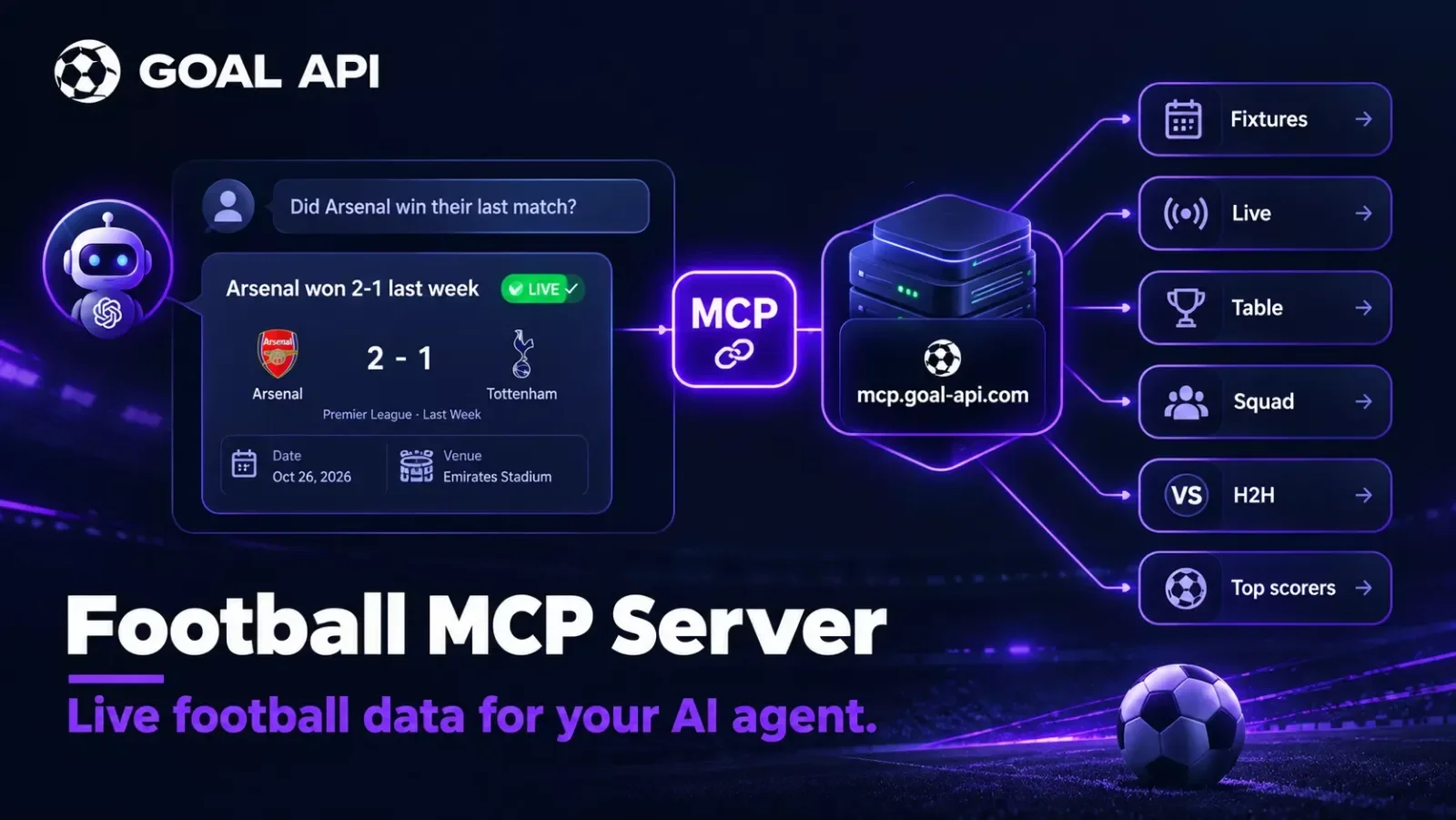
AI agents are only as good as the data they can reach. If you're building with Claude, Cursor, or any MCP-capable client and you want it to answer real football questions — today's fixtures, the live score, the current table — you need a football MCP server. GOAL API runs a hosted one, and connecting it takes a single config entry.
This guide shows exactly how to wire it up and what your agent can do once it's connected. Everything here comes straight from the MCP documentation — no guesswork.
Free tier, no credit card. Grab a key and connect in a couple of minutes: goal-api.com/signup
What Is MCP, and Why Football Data Belongs In It
The Model Context Protocol (MCP) is an open standard that lets AI clients call external tools and data sources in a consistent way. Instead of you writing glue code to fetch data and feed it to the model, the client talks to an MCP server directly and the model gets the tools automatically.
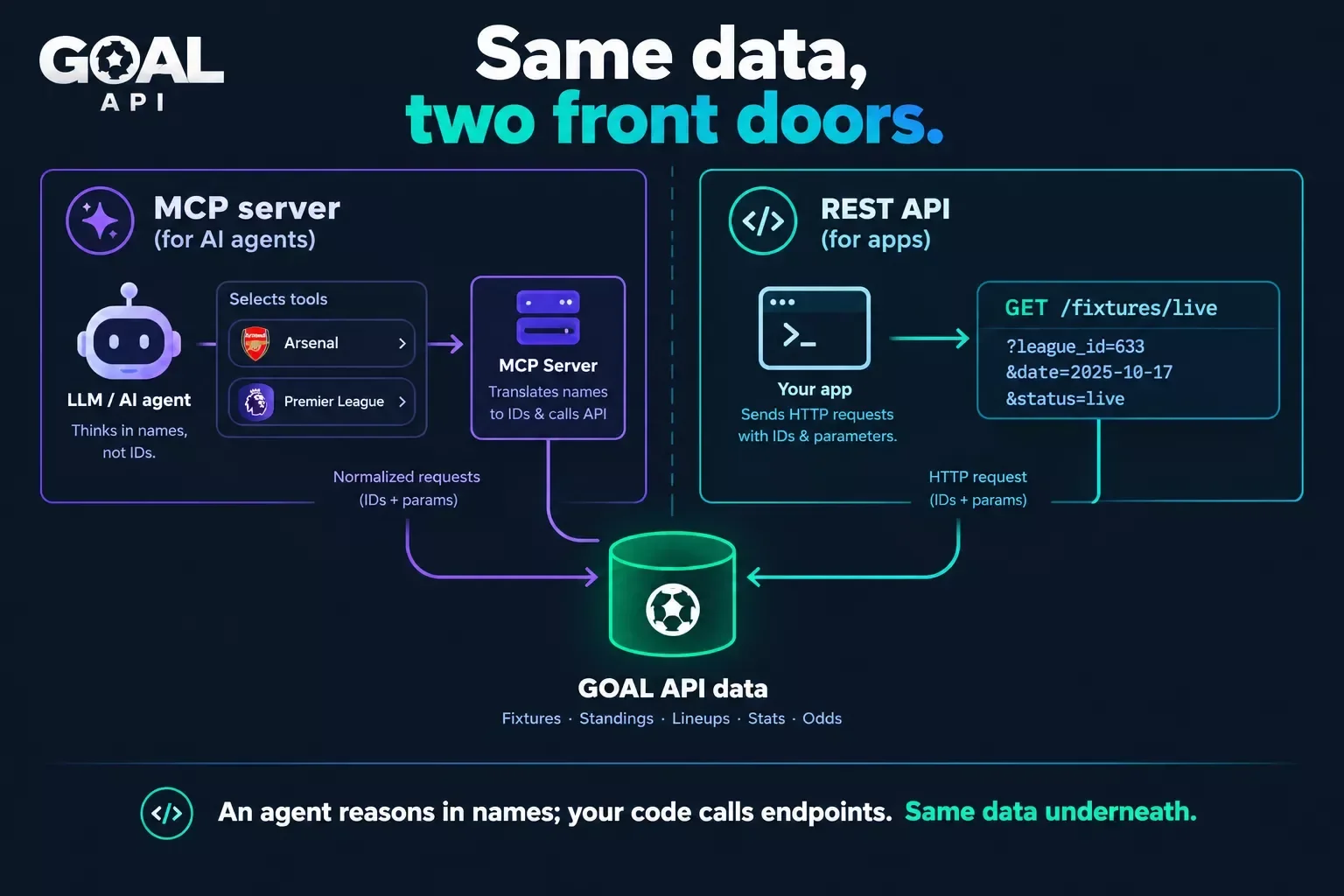
For football, that's the difference between an agent that guesses from stale training data and one that answers from live fixtures and tables. Ask "how did Arsenal do last week?" and an MCP-connected agent queries the real data and answers from it — the same data the REST endpoints serve.
What the GOAL API MCP Server Gives You
The hosted server exposes 14 read-only tools to any MCP client. Per the docs, they cover:
- Fixtures and results
- Live matches
- League tables (standings)
- Team squads
- Head-to-head records
- Top scorers
They're read-only by design — an agent can look things up, but it can't change your account or data. And there's nothing to install: the server is hosted at mcp.goal-api.com/mcp.
Setup: One Config Entry
Add one server entry to your MCP client's config, carrying your GOAL API key as a Bearer token. That's the whole setup — full details in the MCP section of the docs.
{
  "mcpServers": {
    "goal-api": {
      "url": "https://mcp.goal-api.com/mcp",
      "headers": {
        "Authorization": "Bearer YOUR_API_KEY"
      }
    }
  }
}
Claude, Cursor & other MCP clients
Any MCP-compatible client works the same way — you're pointing it at the same URL with the same header. Drop the entry into the client's MCP configuration, restart it, and the football tools appear to the model. No SDK, no server to host yourself.
Querying By Name (No IDs to Look Up)
This is the detail that makes it pleasant to use. Competitions and teams are given by name — there are no numeric IDs to resolve first. You (or the model) can ask about "Arsenal" or "the Premier League" directly, and the tool handles it.
That matters for agents especially: a model reasons in names, not database keys, so by-name tools mean fewer failed calls and no ID-lookup round-trips. Which competitions are available is on the coverage page.
Example Prompts Your Agent Can Answer
Once connected, natural-language questions resolve to real data:
- "How did Arsenal do last week?" → recent results for the team
- "What's the Premier League table right now?" → current standings
- "Which matches are live?" → live fixtures with scores
- "Show me the head-to-head between Real Madrid and Barcelona." → h2h record
- "Who are the top scorers in La Liga?" → the scoring chart
The model picks the right tool, calls it, and answers from the response — you don't orchestrate any of it.
How It's Metered
There's no separate MCP budget. Every tool call counts as one request against your plan, exactly like a REST call. So the free tier and paid plans apply the same way whether your traffic comes from code or from an agent. See the pricing page for plan limits.
Practical note: an agent can be chatty — a single user question may trigger several tool calls as the model explores. Keep an eye on usage the same way you would for a polling integration, and lean on plans sized for your volume.
MCP vs the REST API: When to Use Which
They serve the same data; the right choice is about how it's consumed.
| MCP server | REST API | |
|---|---|---|
| Best for | AI agents, chat assistants, copilots | Apps, backends, dashboards |
| Consumer | An LLM picks & calls tools | Your code calls endpoints |
| Inputs | Competitions & teams by name | IDs and parameters |
| Setup | One config entry, nothing to host | Standard HTTP client |
| Access | Read-only tools | Full REST surface |
| Metering | 1 tool call = 1 request | 1 call = 1 request |
Building a user-facing app with your own UI? Use the REST API documentation. Building something an LLM drives — a football copilot, a research agent, a chat bot? The MCP server is the shortcut.
Security & Good Practice
Your API key travels in the MCP config's Authorization header, so treat that config like any secret:
- Keep the key out of shared or committed config files; use your client's secret storage where it offers one.
- The tools are read-only, so a connected agent can't mutate your account — but the key still meters against your plan, so don't paste it into untrusted clients.
- Rotate the key from the dashboard if it's ever exposed.
What to Build Next
A football research copilot — an assistant that answers fan or analyst questions from live data, no custom backend.
A Slack or Discord agent — wire an MCP-capable agent into your chat so members ask it for scores and tables.
A data layer for an existing agent — if you already run an AI product, add football as one more tool source. For a full UI build instead, see the best football API comparison or the fantasy football app guide.
FAQ
What is a football MCP server? An MCP endpoint that lets an AI client query football data directly. GOAL API's is hosted at mcp.goal-api.com/mcp with 14 read-only tools.
How do I connect Claude to football data? Add one entry to your MCP config pointing at the URL above with an Authorization: Bearer header carrying your key. No install.
Do I need league or team IDs? No — competitions and teams are given by name.
Does it cost extra? No separate budget; each tool call is one request against your plan.
Connect your agent free → goal-api.com/signup | No credit card | One config entry, 14 tools